Most traders spend weeks researching which EA to buy. They compare Myfxbook accounts, analyse equity curves, check withdrawal history. Then they deposit $3,000 into the first broker that appears in a Google search and wonder why their EA underperforms the verified results they were shown.
Broker choice is not a secondary decision. For scalping and gold EAs, it can account for 15–30% of performance difference from the first quarter of live trading. For grid EAs, the wrong broker can be the direct cause of a blown account — not the EA itself.
The evidence is not theoretical. In the Quantum Queen EA review, two traders ran identical EAs with dramatically different results: one account ran profitably for two years on a proper ECN setup; another account on XM — a market maker with wider spreads — was destroyed in 12 days. The EA did not change. The broker did.
This guide provides the framework for matching broker type to EA strategy type — the decision most EA guides skip entirely.
Why the Wrong Broker Kills a Good EA
How spread costs compound across hundreds of trades
A scalping EA targets 8–12 pips per trade. That is its designed profit range — the reason it was built and the range its backtests assume. Now consider what happens when spread changes:
| Scenario | EA target | EURUSD spread | Net profit per trade | After 500 trades/year |
|---|---|---|---|---|
| ECN broker | 10 pips | 0.5 pip | 9.5 pips | Full performance |
| Standard broker | 10 pips | 1.5 pips | 8.5 pips | ~11% degradation |
| Market maker | 10 pips | 2.5 pips | 7.5 pips | ~25% degradation |
At 25% degradation, an EA generating 8% monthly on a tight ECN account produces approximately 6% on a wide-spread account — before accounting for slippage. After a full year, that gap compounds into a meaningful difference in account equity. The EA has not changed. The broker has extracted the difference.
For gold (XAUUSD) EAs, the impact is even more acute. Gold spreads vary dramatically between brokers — from 15 cents per pip to over 50 cents during volatile sessions. A gold EA targeting $5–$8 per trade at 0.10 lot faces a very different cost structure on a 50-cent spread broker versus a 20-cent spread broker.
Market maker vs ECN: what actually changes for EAs
The distinction between market maker and ECN execution is not marketing language. For EA trading, it determines three things:
Re-quoting. Market makers can re-quote orders — declining your EA’s requested price and offering a different one. This introduces slippage on entries and exits beyond what the EA’s logic accounts for. For scalping EAs that rely on precise entry prices, re-quotes directly damage profitability. ECN brokers pass orders to liquidity providers without re-quoting.
Spread widening during news events. Market maker spreads often widen significantly during high-impact news (Fed decisions, NFP, CPI releases). An EA without a built-in news filter may enter a trade during a 3-pip widening event and immediately face a larger cost than its entire target profit. ECN spreads also widen during news, but typically less aggressively and with more predictability.
Position restrictions. Some market makers limit the number of concurrent open positions, minimum stop loss distance from entry, or close positions during specific conditions. Grid EAs routinely run 5–15 concurrent positions. A broker restricting concurrent positions will prevent the grid from operating as designed.
The prohibited trading practices trap
Many EA traders deposit funds without reading the broker’s Terms and Conditions. This is a significant risk — particularly for three EA categories that brokers commonly restrict:
Latency arbitrage EAs exploit price feed delays between brokers. These are banned by virtually every broker, including ECN ones. Accounts running detected latency arbitrage are routinely flagged and closed without warning.
High-frequency scalpers placing hundreds of trades per day may violate some brokers’ policies against “tick scalping” — entering and exiting positions within seconds. Before running a high-frequency EA, search the broker’s T&Cs for the terms “tick scalping,” “latency exploitation,” and “price manipulation.”
Grid EAs with large position counts can trigger automated risk flags at some brokers. Thirty simultaneous open positions on a $1,000 account may trigger a margin policy intervention even when total margin used is within limits. Confirm the broker explicitly permits hedging and multi-position strategies.
Match Your EA Strategy to the Right Broker Type
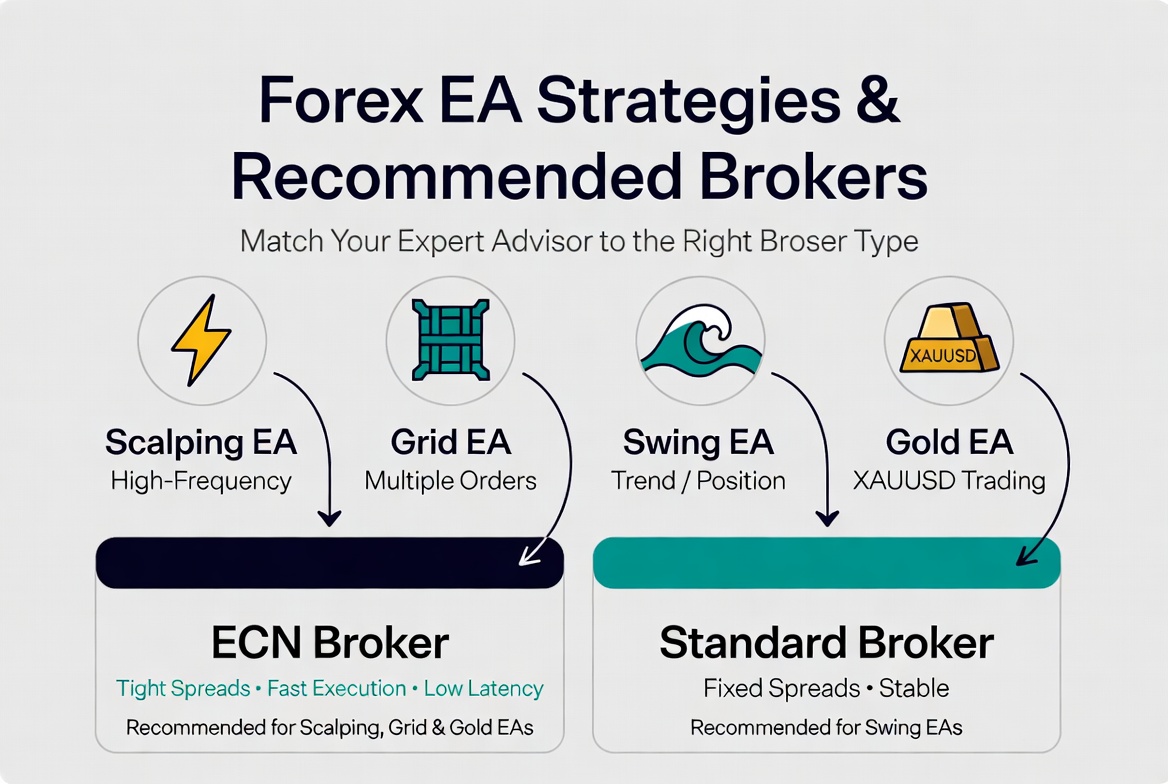
The most important insight most EA broker guides miss: there is no single “best broker for EA trading.” The correct broker depends entirely on your EA’s strategy type. A broker that is excellent for a swing EA is not optimal for a scalping EA — and running the wrong EA type on the wrong broker infrastructure is the most common source of EA underperformance that has nothing to do with the EA itself.
| EA Strategy Type | Examples | Broker Requirement | Critical Metric | Avoid |
|---|---|---|---|---|
| Forex scalping | Forex Fury, Forex Robotron | Tier-1 ECN — Raw/Razor account | EURUSD spread under 0.8 pip, execution under 40ms | Any market maker; standard accounts with fixed spreads |
| Gold scalping (XAUUSD) | Forex Fury GOLD, Golden Pickaxe | ECN with tight XAUUSD spread | XAUUSD average spread under 20 cents | Brokers with XAUUSD spread above 30 cents average |
| Grid / multi-position | Waka Waka, FXStabilizer | High leverage, unrestricted concurrent positions | Leverage 1:500+, no concurrent position limit | Brokers restricting simultaneous positions or hedging |
| Swing / trend-following | SCR-EURAUD, Beetle EA | Standard or ECN — both acceptable | Overnight swap rate on held pairs | Brokers with punitive swap rates on the EA’s specific pairs |
| Night scalping (Asian session) | FXStabilizer EUR Turbo | Low spread specifically during Asian session hours | Spread consistency 21:00–02:00 GMT | Brokers that widen spread significantly outside London/NY hours |
The practical implication: before choosing a broker, identify exactly which category your EA falls into. A trader running Forex Robotron (scalping, 5-minute timeframe, 500 trades per year) needs fundamentally different broker infrastructure than a trader running SCR-EURAUD (trend-following, 3-hour average trade duration, 250 trades per year).
For guidance on which EA strategy type is right for your capital level and risk tolerance, the consistent monthly profits EA comparison covers verified data across strategy types. For understanding the specific risks of grid strategies — particularly the broker dependency of systems like Waka Waka — the Waka Waka Myfxbook analysis covers the complete picture.
5 Things to Check Before Depositing with Any Broker for EA Trading
These five checks take approximately 20 minutes and prevent the most common EA setup mistakes. Complete all of them before depositing any capital.
1. EA Policy: Read the T&Cs, Not the Sales Page
The broker’s sales page will tell you “all EAs are welcome.” The Terms and Conditions will tell you what actually happens to accounts running specific strategies. Search the T&Cs document for: “scalping,” “automated trading,” “expert advisor,” “hedging,” “grid,” “martingale,” “latency,” and “prohibited.” What you find determines whether your EA will operate without restriction or risk account suspension.
A broker that explicitly states “scalping permitted” in its T&Cs is a fundamentally safer environment for scalping EAs than one that says nothing — because the explicit statement is a contractual commitment. If you cannot find explicit EA permission in writing, contact support and ask directly. Document the response.
2. Spread on Your Specific Instrument: Not Just EURUSD
Broker comparison tables almost always lead with EURUSD spread. If your EA trades GBPJPY, XAUUSD, EURAUD, or any pair other than EURUSD, the EURUSD spread is irrelevant to your cost structure. Request or check the broker’s spread data for the exact pairs your EA trades — during the session your EA operates in, not just during London peak hours.
XAUUSD spreads, in particular, vary enormously between brokers and between sessions. A broker advertising “XAUUSD from 10 cents” may average 35 cents during the Asian session when many gold EAs operate. Check the average, not the minimum.
3. Server Location: Latency to Your Broker Matters for Scalpers
Scalping EAs depend on fast order execution. The physical distance between your VPS server and your broker’s trading server determines baseline latency. Brokers with servers at Equinix NY4 (New York) or LD4 (London) data centres provide the lowest latency for EAs hosted at those locations. Brokers running servers elsewhere — or not disclosing server location — add unpredictable latency to every order.
For swing and trend EAs, server latency matters far less — a 50ms difference on a 3-day trade is negligible. For scalping EAs targeting 8–12 pip moves, a consistent 30ms latency advantage represents meaningful execution improvement across 500 annual trades.
4. Demo Spread vs Live Spread: Confirm They Match
Some brokers route demo accounts through different liquidity than live accounts, resulting in tighter demo spreads that do not reflect real trading conditions. This makes demo results systematically optimistic compared to what the EA will produce on live capital.
Before going live: run the EA on demo for 2–4 weeks and record the average spread shown in each closed trade. Compare this to the broker’s published live average spread for the same pairs. A difference above 0.3 pips (EURUSD equivalent) suggests the demo environment does not accurately represent live conditions.
5. Withdrawal Policy: Profit You Cannot Extract Is Not Profit
EA trading generates profit in the account. Whether you can access that profit depends entirely on the broker’s withdrawal infrastructure. Before depositing, confirm: minimum withdrawal amount, processing time, available withdrawal methods, and whether any bonus conditions restrict withdrawal. Brokers offering deposit bonuses frequently attach trading volume requirements that lock funds until specific conditions are met — conditions that effectively prevent withdrawal of profits generated by EAs operating conservatively.
The safest verification: find the broker’s independent reviews specifically mentioning withdrawal experiences, not just account opening. A broker with fast deposits and slow withdrawals is a meaningful operational risk for EA traders who may want to extract profits monthly.
5 Brokers EA Traders Actually Use Matched to Strategy Type
These five brokers appear consistently in verified EA Myfxbook accounts, forum discussions, and EA vendor recommendations. Each is analysed specifically for EA trading conditions — not general trading metrics.
IC Markets: Best for Scalping and Gold EAs
Account type for EAs: Raw Spread (0.0 pips from + $3.50/lot commission) | MT4, MT5, cTrader
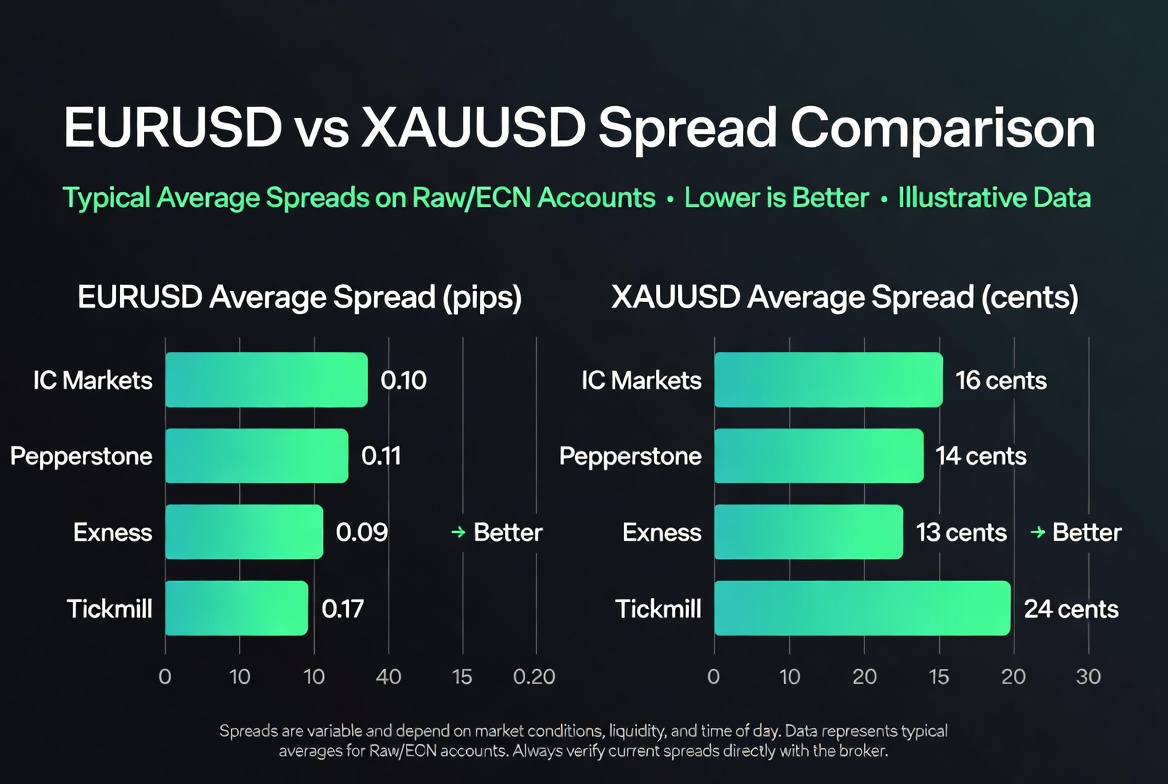
EURUSD average spread: 0.1 pip (Raw) | Server: Equinix NY4, LD4, AP
XAUUSD average spread: ~15–20 cents | EA restrictions: None stated
Regulation: ASIC (Australia), CySEC, FSA Seychelles
IC Markets appears more frequently in verified Myfxbook accounts for scalping EAs than any other broker on this list. The Razor/Raw account delivers the spread conditions that scalping strategies require — consistently, not just during peak hours. Server placement at Equinix data centres (the same facilities used by institutional forex participants) keeps order routing latency minimal.
For gold EAs specifically, IC Markets’ XAUUSD spread is among the tightest in retail forex — averaging 15–20 cents across sessions, with predictable widening during news events rather than the unpredictable spikes seen on some standard brokers. This consistency matters for gold EAs that may enter during off-peak hours.
Best for: Forex Fury, Forex Robotron, Golden Pickaxe, any scalping EA targeting sub-15 pip moves. Also suitable for grid EAs — hedging explicitly permitted, no concurrent position limits documented.
What concerns me: The Raw account’s commission ($3.50/lot/side = $7 round-trip) adds to cost at lower trade volumes. At less than 50 lots per month, the Standard account’s wider spread may actually be cheaper than Raw account commissions. Calculate your EA’s expected monthly volume before choosing account type.
Pepperstone: Best for MT4/MT5 EA Compatibility and Support
Account type for EAs: Razor (0.0 pips from + $3.50/lot) | MT4, MT5, cTrader, TradingView
EURUSD average spread: 0.1 pip (Razor) | Server: Equinix NY4, LD4, TY3
EA restrictions: Scalping, hedging, and automated trading explicitly permitted in T&Cs
Regulation: ASIC, FCA, CySEC, DFSA, SCB
Pepperstone’s primary advantage for EA traders is explicit policy clarity. The T&Cs state that scalping, hedging, and expert advisors are permitted — this is the contractual commitment that matters when an automated system is running on your account 24 hours per day. Many brokers tolerate EA trading in practice but do not commit to it in writing; Pepperstone’s explicit policy reduces the risk of account action based on trading style.
The multi-platform support (MT4, MT5, cTrader, TradingView) means the same broker works for any EA stack without needing separate broker relationships. For traders running multiple EAs across different platforms simultaneously, this reduces administrative complexity.
Best for: Multi-EA traders, grid and hedging strategies, any EA requiring explicit written confirmation of strategy permission. Strong option for Waka Waka EA — hedging explicitly permitted, high leverage available.
What concerns me: Pepperstone’s XAUUSD spread is competitive but slightly wider than IC Markets during off-peak hours. For gold-focused EAs, IC Markets typically offers marginally better XAUUSD conditions.
Exness: Best for Gold EA Traders and Small Accounts
Account type for EAs: Standard (no commission, spread-only) or Raw Spread (0.0 pips + $3.50)
EURUSD average spread: 0.3 pip (Standard), 0.1 pip (Raw)
XAUUSD spread: Competitive on Standard; Raw Spread tightest for high-volume gold EAs
Leverage: Unlimited on accounts under $1,000 | MT4, MT5
Regulation: FCA, CySEC, FSCA, FSA
Exness occupies a specific niche in EA trading: small accounts running gold EAs. The unlimited leverage on accounts under $1,000 — combined with competitive XAUUSD spreads — makes it particularly suitable for traders starting with $500–$1,000 in capital who want to run a gold EA without the margin constraints that limit lot sizing on lower-leverage accounts.
Instant withdrawals are Exness’s most operationally distinctive feature. EA profits can be withdrawn in minutes, not days. For traders who want to extract monthly profits from an EA rather than compound indefinitely, this removes the withdrawal processing uncertainty that creates friction with other brokers.
Best for: Forex Fury GOLD, small account gold EA traders ($500–$3,000), any EA where monthly profit extraction is the goal rather than long-term compounding.
What concerns me: The Standard account’s spread-based pricing (no commission) works well for low-to-medium frequency EAs, but for high-frequency scalpers the spread-only model can be more expensive than Raw Spread + commission at volume. Run the numbers for your specific EA’s trade frequency before choosing account type.
Tickmill: Best Budget ECN for Scalping EAs
Account type for EAs: Pro (0.0 pips + $2/lot commission — lowest commission on this list)
EURUSD average spread: 0.1 pip (Pro)
Minimum deposit: $100 (lower than IC Markets or Pepperstone)
Regulation: FCA, CySEC, FSA, DFSA
Tickmill’s Pro account offers the lowest round-trip commission of any ECN broker on this list — $4 per round-turn versus $7 at IC Markets or Pepperstone. For high-frequency scalping EAs executing 500+ trades per year, that $3 difference per round-turn becomes $1,500+ in annual cost savings on 500 lots of volume. At high trade frequencies, commission arithmetic matters.
The lower minimum deposit ($100 on Pro) makes it accessible for traders who want ECN conditions without committing large capital to a new broker relationship during testing.
Best for: High-frequency scalping EAs where per-trade commission cost is the primary concern. Suitable for Forex Robotron’s volume profile (approximately 500 EUR-pair trades per year).
What concerns me: Tickmill’s XAUUSD spread is not as competitive as IC Markets for gold EAs. Server location options are fewer than IC Markets or Pepperstone, which may add marginal latency depending on VPS location. For gold EAs, IC Markets or Exness remain better choices.
How to Identify the Wrong Broker For EAs Before Depositing
Rather than naming specific brokers to avoid — conditions change — here are the characteristics that identify an unsuitable EA broker regardless of brand name:
- Dealing desk execution (Market Maker) without disclosure. If the broker’s order execution page does not explicitly state “ECN,” “STP,” or “NDD,” assume dealing desk until proven otherwise. Ask specifically: “Are you a market maker on forex and gold trades?”
- Spreads that vary dramatically between their website and their trading platform. Open a demo, place a manual trade, and read the actual spread from the platform. If it differs significantly from the advertised spread, the live account will be worse.
- Bonus conditions attached to deposits. Any bonus that requires trading volume before withdrawal creates a conflict with EA trading. The EA may generate profit, but withdrawal is blocked until the bonus volume requirement is met.
- No explicit EA permission in the T&Cs. Silence on automated trading in broker T&Cs is a risk indicator. If the broker does not explicitly permit your EA strategy type, you have no contractual basis to dispute a future account restriction.
- XAUUSD spread above 30 cents average for gold EAs. Any gold EA running on a broker with average XAUUSD spread above 30 cents will face systematically higher costs than the EA’s developers designed for.
The Quantum Queen analysis demonstrates what happens when an EA runs on unsuitable broker infrastructure — a $10,000 account reduced to $3.40 in 12 days, partially attributed to XM’s market maker execution model. Full account analysis: Quantum Queen EA review.
Setting Up Your EA on a New Broker
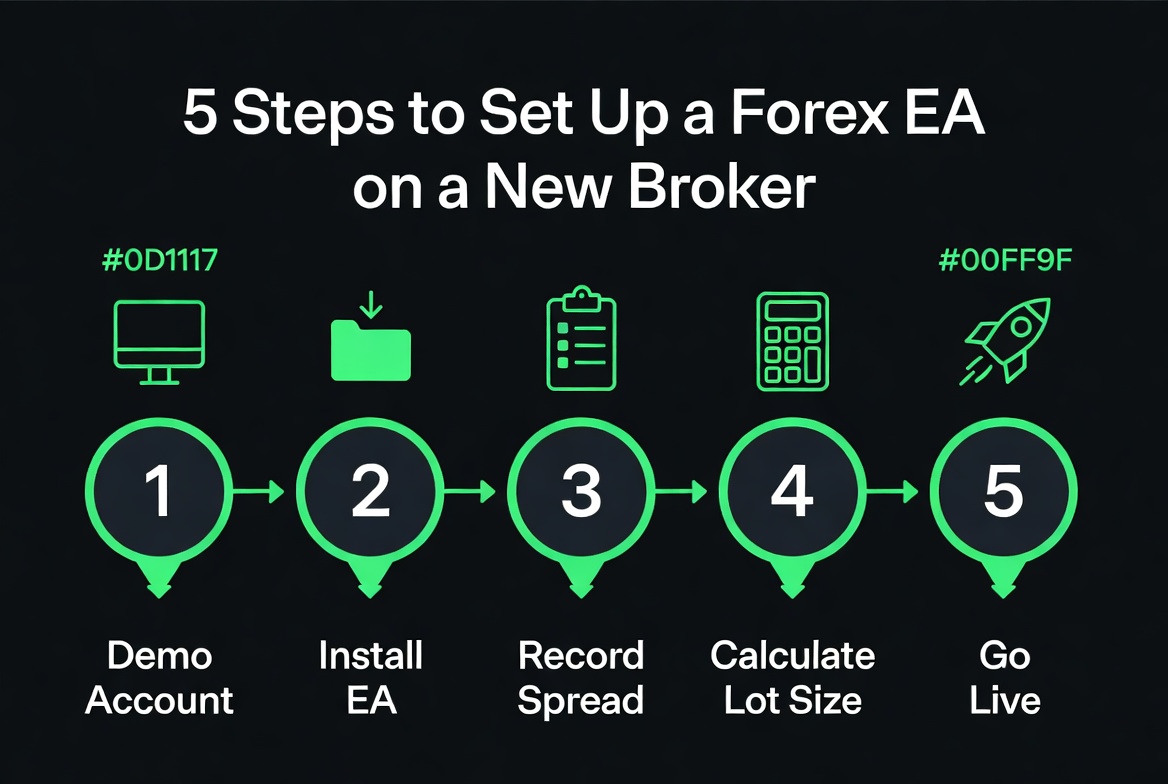
The sequence in which you set up an EA on a new broker matters. The most common setup error is running the EA on a live account immediately after reading a positive Myfxbook account from a different broker — without testing whether the EA behaves the same way on the new broker’s infrastructure.
- Open a demo account with the exact account type you plan to use live. Raw Spread demo if you plan to trade Raw Spread live. Standard demo if you plan Standard live. Different account types route differently.
- Install the EA on demo and run it for 2–4 weeks through different market sessions. For scalping EAs, this must include at least one news event (NFP, CPI, or Fed decision) to observe spread behaviour during volatility.
- Record average spread per trade from the EA’s trade history. Compare against the broker’s advertised average spread. A gap above 0.3 pips (EURUSD equivalent) indicates the demo does not match live conditions.
- Calculate correct lot size for your account using the position size calculator before going live. Do not use the EA vendor’s default settings without verifying they match your account size and risk tolerance. The position size calculator covers this calculation for all major pairs including XAUUSD.
- Go live with the smallest allowed lot size for at least the first two weeks. This confirms live execution matches demo behaviour before scaling to intended lot sizes.
For the complete step-by-step EA installation process on MT4 and MT5 — including the Inputs tab where lot size and risk parameters are configured — see the full guides: how to install a forex robot on MT4 and how to install a forex robot on MT5.
If you are still selecting which EA to run on your new broker, the verified Myfxbook EA comparison covers 10 EAs with honest risk analysis matched to different capital levels and strategy preferences.
Frequently Asked Questions
Is Exness good for forex EA trading?
Exness is a solid choice for most EA types — particularly for gold (XAUUSD) scalping EAs and small account traders. Key advantages: competitive XAUUSD spreads, unlimited leverage on accounts under $1,000, instant withdrawals, and explicit EA support on both MT4 and MT5. The Standard account works well for swing and trend-following EAs. For high-frequency scalping, the Raw Spread account (0.0 pips + $3.50 commission) delivers better cost efficiency at volume.
Can I use any broker for Waka Waka EA?
Waka Waka is a grid EA — it opens multiple positions simultaneously and needs significant margin headroom to extend the grid during adverse moves. The critical requirement is a broker that does not re-quote or reject orders during volatility spikes, since grid EAs place many orders rapidly. High leverage (at least 1:200, ideally 1:500) is important for grid capital efficiency. Avoid brokers with dealing desk execution or explicit restrictions on simultaneous open positions. The Waka Waka analysis covers the complete broker dependency picture.
What XAUUSD spread do I need for gold EA trading?
For XAUUSD scalping EAs: maximum 20 cents average spread. Above this level, spread cost begins to meaningfully erode per-trade profit on short-target strategies. For swing or trend-following gold EAs: 30–50 cents is acceptable since the expected pip target per trade is larger. Always check average spread across all trading sessions — not just the minimum or the London session figure. For context on how gold EAs perform in practice, the best gold forex robot guide covers verified XAUUSD performance data.
Does broker choice affect Myfxbook results?
Yes — significantly. The same EA running on a tight ECN broker versus a wide-spread market maker will show different equity curves, drawdown figures, and monthly returns in Myfxbook. When comparing two Myfxbook accounts running the same EA, always check which broker each account uses. An account showing better performance on a market maker broker may actually represent an inferior setup compared to a slightly lower-return account on ECN — because the ECN account’s results are more sustainable. This is exactly the dynamic visible in the Quantum Queen account comparison.
Should I test an EA on demo before going live with a new broker?
Yes — specifically to confirm the broker’s demo spread matches its live spread. Some brokers run demo accounts through tighter liquidity than live accounts, making demo results systematically better than live trading. Run the EA on demo for at least 2–4 weeks, record average spread per trade, and compare against the broker’s published live average spread. A difference above 0.3 pips (EURUSD equivalent) suggests the demo environment does not accurately represent live conditions. Going live immediately without this verification is the most common avoidable EA setup mistake.
